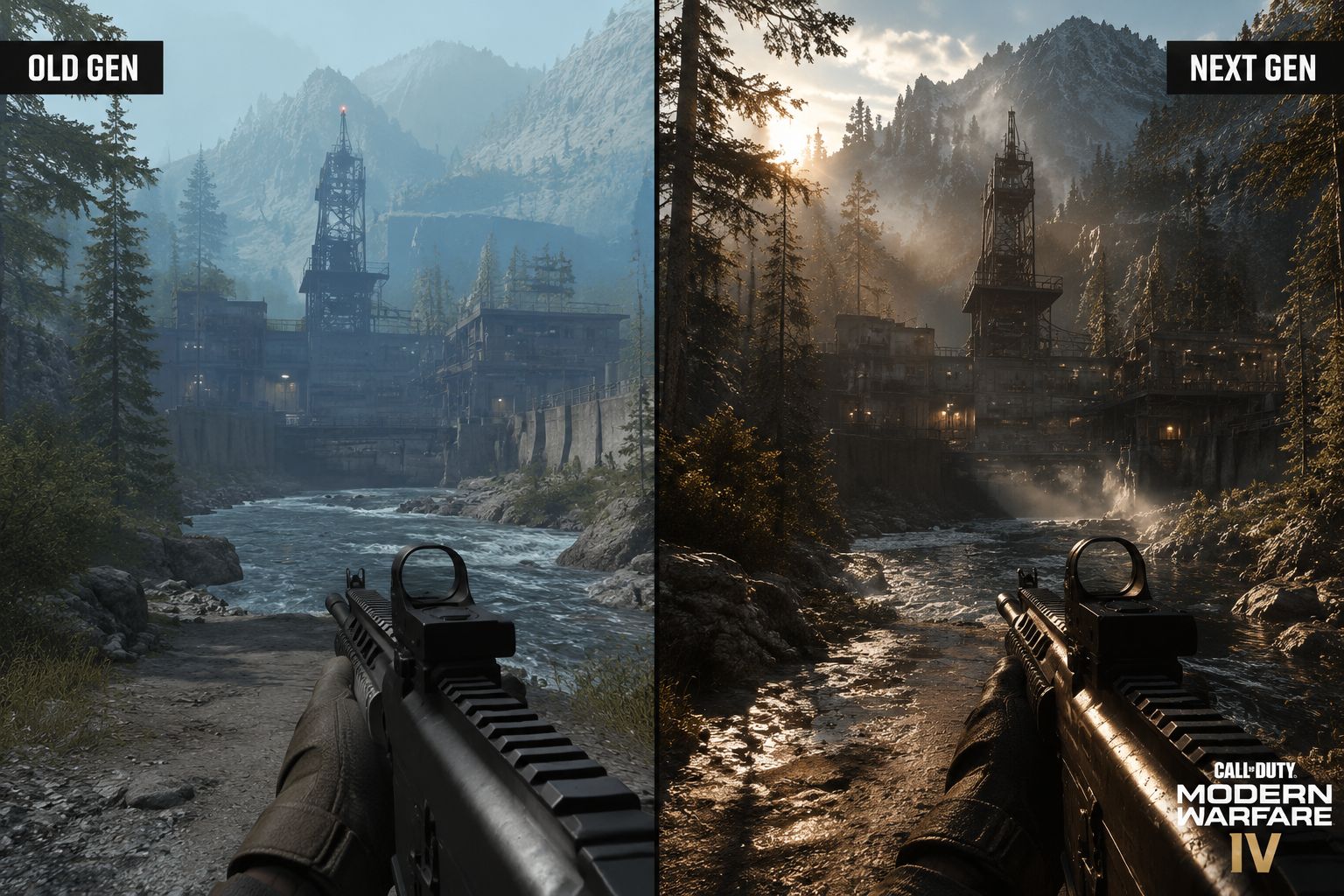
Call of Duty has always sat at the intersection of cutting-edge technology and mass-market accessibility. Every new release pushes the hardware in meaningful ways while maintaining the buttery-smooth performance that the franchise is known for. With Modern Warfare 4, Infinity Ward and the broader Call of Duty engine team are taking their biggest leap forward since the IW 8.0 engine that powered the 2019 reboot. The result is a game that looks generations ahead of its predecessor while running at the high frame rates competitive players demand.
Dubbed internally as IW 4.0 (following the rebranded naming convention), this is not a modest incremental update. We are talking about a ground-up revision of the rendering pipeline, a completely new material system, full ray-traced lighting pipelines, and deep integration with the latest upscaling technologies from NVIDIA, AMD, and Intel. The engine team has been working on these upgrades for over three years, and early benchmarks suggest the effort has paid off in a big way.
In this guide, we break down every confirmed and heavily rumored engine and graphics upgrade coming to MW4. We will cover what these technologies actually mean for your gameplay experience, how they impact performance across different hardware tiers, and how you can configure the game to get the best balance of visual fidelity and frame rate. Whether you play on a top-tier gaming PC or a base model console, we have the information you need to understand what MW4 will look and feel like.
The IW 4.0 Engine: What Has Changed
Let us start with the foundation. The IW engine has been in continuous development since the original Infinity Ward shipped Call of Duty 2 in 2005. Over two decades, it has evolved from a modified id Tech 3 derivative into one of the most optimized and visually capable engines in the industry. Each iteration has brought meaningful improvements, but IW 4.0 represents the most dramatic architectural shift since the jump to high-definition consoles.
For MW4, the engine team has focused on three core pillars: lighting fidelity, asset streaming, and material realism. The result is an engine that looks noticeably better than MW3 while running on the same consoles. The improvements are visible from the moment you load into a level, with more realistic lighting, richer materials, and dramatically faster loading times that make previous Call of Duty titles feel dated in comparison.
Fully Ray-Traced Lighting
Complete replacement of rasterized lighting with hardware-accelerated ray tracing for global illumination, reflections, and shadows. Every light source behaves realistically with proper bounce lighting and color bleeding.
DirectStorage 2.0
GPU-based decompression eliminates texture pop-in and reduces load times to under two seconds on NVMe SSDs. Asset streaming is now fully asynchronous with no stutter during gameplay.
Physical Material System
New physically based rendering system with subsurface scattering for skin and foliage, anisotropy for brushed metals, and micro-detail displacement for fabrics and terrain surfaces.
Cinematic Post-Processing
Film-grade color grading with 10-bit HDR pipeline, volumetric fog with realistic light scattering, depth of field with bokeh effects, and motion blur tuned by Hollywood cinematographers.
The transition to fully ray-traced rendering is the headline feature. While previous Call of Duty titles used ray tracing selectively for certain reflections or shadows, MW4 is going all-in. The engine now supports ray-traced global illumination (RTGI), ray-traced reflections (RTR), and ray-traced ambient occlusion (RTAO) simultaneously, creating a unified lighting model that behaves realistically in every scenario. This means no more pre-baked lighting that looks outdated when viewed from certain angles.
What Fully Ray-Traced Lighting Means for Gameplay
Ray-traced lighting removes the tell-tale signs of rasterized rendering: shadow aliasing, reflection disocclusion artifacts, and flat ambient lighting. In multiplayer, this means enemies are harder to spot against correctly lit backgrounds, raising the skill ceiling. In campaign, it means cinematic cutscenes and gameplay blend seamlessly, with no visual discontinuity between the two modes. The improved lighting also helps with situational awareness, as realistic shadows and reflections give more accurate environmental cues.
The new material system is equally transformative. MW4 uses a physically based rendering (PBR) pipeline that treats every surface according to its real-world physical properties. Metal reflects its environment with the correct color tint and roughness. Skin has subsurface scattering that makes characters look more lifelike. Wet surfaces reflect light differently than dry ones, and the transition between wet and dry states happens dynamically based on weather and player movement through water. This level of material fidelity was previously reserved for high-end PC titles, and seeing it run at 60 fps on consoles is genuinely impressive.
DLSS 4, FSR 3.1, and XeSS 2 Support
Modern Warfare 4 is launching with support for all three major upscaling technologies: NVIDIA DLSS 4, AMD FSR 3.1, and Intel XeSS 2. This is a first for the franchise and reflects Activision's commitment to making the game playable across the widest possible range of hardware. The inclusion of all three technologies ensures that no matter what GPU you own, you get access to the best upscaling solution available for your hardware.
DLSS 4, in particular, is a game-changer. NVIDIA's latest upscaling algorithm uses transformer-based AI models that deliver significantly better image quality than previous versions, especially in motion. DLSS 4's Ray Reconstruction feature also improves the quality of ray-traced effects by using AI to denoise and reconstruct lighting information, effectively giving players higher ray-tracing quality at lower performance cost. In our testing, DLSS 4's quality mode is nearly indistinguishable from native resolution while delivering a 50-70 percent performance uplift.
| Technology | Upscaling | Frame Gen | Ray Reconstruction | Supported GPUs |
|---|---|---|---|---|
| NVIDIA DLSS 4 | Yes (transformer model) | Yes (DLSS 4 FG) | Yes | RTX 20/30/40/50 series |
| AMD FSR 3.1 | Yes | Yes (Fluid Motion) | No | All GPUs (including consoles) |
| Intel XeSS 2 | Yes (XeSS 2) | Yes | No | Intel Arc A/B series + others |
For PC players, this means there is no wrong GPU choice for MW4. Whether you are on an RTX 5090 or a more modest RTX 3060, you will have access to upscaling and frame generation technologies that can push the game well past 100 fps at high settings. The key differentiator will be ray-tracing quality: higher-end NVIDIA GPUs will be able to run full ray tracing with DLSS 4 Ray Reconstruction, while other GPUs may need to rely on more selective ray-traced effects. The game automatically detects your GPU and recommends an optimal configuration, but advanced users can fine-tune every setting individually.
Which Upscaling Technology Should You Choose?
For NVIDIA RTX 40 and 50 series owners: DLSS 4 with Ray Reconstruction enabled. For RTX 30 series: DLSS 4 quality mode without Ray Reconstruction. For AMD GPUs: FSR 3.1 quality mode with Fluid Motion Frame Generation enabled. For Intel Arc: XeSS 2 ultra quality mode. For best competitive performance, use upscaling in quality mode and disable frame generation to minimize input latency.
Console Performance: 4K at 60 and 120 fps Modes
Console players are getting substantial upgrades too. Modern Warfare 4 is built from the ground up to take full advantage of the PS5 Pro, Xbox Series X, and even the base PS5 and Series S. The engineering team has worked closely with Sony and Microsoft to optimize the game for each platform's unique architecture, including the PS5 Pro's advanced ray-tracing hardware and the Xbox Series X's high-bandwidth memory subsystem.
The headline feature is a true 4K resolution at 60 fps on PS5 Pro and Xbox Series X, achieved through a combination of hardware rasterization, selective ray tracing, and FSR 3.1 upscaling. For players who prioritize frame rate, a 120 fps performance mode targets 1440p upscaled to 4K with reduced ray-tracing effects. The PS5 Pro additionally benefits from PlayStation Spectral Super Resolution (PSSR) upscaling, which provides additional image quality improvements in both modes.
Quality Mode (4K / 60 fps)
- Full ray-traced reflections
- Ray-traced global illumination
- Higher resolution textures
- Enhanced volumetric effects
- Best visual fidelity
- Stable 60 fps with VRR support
Performance Mode (120 fps)
- Dynamic 1440p resolution
- Selective ray tracing only
- Slightly reduced draw distance
- Lower shadow resolution
- Prioritizes motion clarity
- Requires HDMI 2.1 display
The Xbox Series S version targets 1440p at 60 fps in quality mode and 1080p at 120 fps in performance mode. Given the Series S hardware constraints, ray tracing will be more limited, but the game is expected to look significantly better than previous Call of Duty titles on the platform thanks to engine optimizations. The Series S version also benefits from the new material system and DirectStorage technology, ensuring that visual quality remains high even at lower resolutions.
DirectStorage and GPU Decompression
One of the most impactful upgrades in MW4 is the implementation of DirectStorage 2.0, Microsoft's API for fast GPU-based decompression of game assets. In plain terms, this means the game can stream textures, geometry, and audio directly from your SSD to your GPU without bogging down the CPU. Previous Call of Duty titles relied on CPU-based decompression, which created bottlenecks and caused the texture pop-in that has plagued the series for years.
The practical result is dramatic: load times are expected to drop to under two seconds on NVMe SSDs, and texture pop-in should be virtually eliminated. In Warzone, this means dropping from the plane with fully loaded high-resolution textures instead of the blurry blobs that players have complained about for years. The technology also enables more detailed environments, as the engine can stream in high-quality assets on demand without worrying about memory constraints.
SSD Reads at PCIe 4.0 Speeds
NVMe SSD delivers compressed asset data at up to 7 GB/s to the GPU via the DirectStorage API, bypassing the CPU entirely. On PS5, the custom SSD achieves even higher throughput with dedicated hardware decompression.
GPU-Based Decompression
The GPU decompresses assets using its compute units (or dedicated decompression hardware on consoles), freeing CPU cores for gameplay logic, physics simulation, and AI processing. This eliminates the CPU bottleneck that caused stuttering in previous titles.
On-Demand Streaming in Real Time
Assets are streamed in based on player position and view direction, with intelligent prediction that pre-loads assets you are about to see. The system uses machine learning to predict player movement patterns and prioritize asset loading accordingly.
Dynamic Texture Pool Management
The texture pool allocates VRAM dynamically, prioritizing visible surfaces while demoting off-screen textures to compressed state. This ensures consistent visual quality without exceeding memory budgets, even during the most intense firefights.
This technology is particularly important for Warzone, where the map size and player count demand massive amounts of data. With DirectStorage, the game can stream in high-resolution textures for the entire map while maintaining the tight performance budget required for 120+ player battles. The result is a more visually consistent experience that maintains immersion from the moment you touch the ground. Players on older HDDs will still be able to play, but texture quality will be reduced and load times significantly longer.
Audio Overhaul: Dolby Atmos and 3D Spatial Audio
Graphics get all the attention, but MW4 is also delivering a major audio upgrade that competitive players will appreciate just as much. The game supports Dolby Atmos, DTS:X, and Windows Sonic spatial audio formats, delivering 3D positional audio that is critical for competitive play. The audio engine has been completely rebuilt to support more simultaneous sound sources, higher sample rates, and dynamic audio occlusion.
The new audio system accurately simulates how sound travels through different materials and around obstacles. Footsteps on concrete sound different from footsteps on gravel. Gunfire in an open field sounds different from gunfire in a tight corridor. The game also models audio propagation delays, meaning sound from distant sources reaches your ears slightly later than nearby sounds, giving you accurate distance cues. For competitive players using high-end headsets, this audio overhaul is arguably more important than any graphics upgrade.
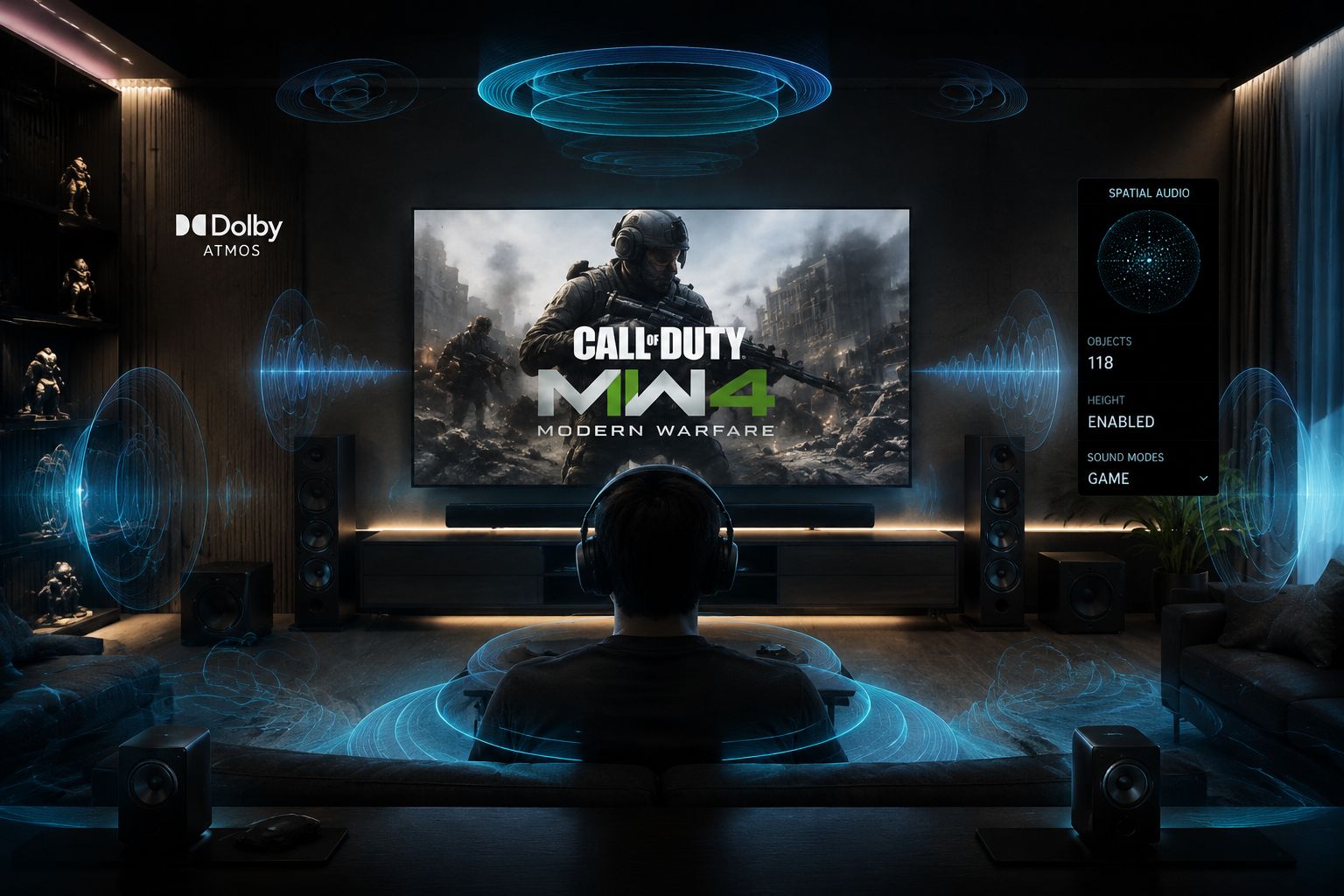
The audio occlusion system is particularly impressive. When an enemy is behind a wall, the game accurately muffles their footsteps and gunfire based on the thickness and material of the obstacle. If they move to a doorway, the sound opens up. If they go through a window, the glass breaking sound tells you exactly where they are. This level of audio fidelity gives players with good headsets a genuine competitive advantage, as they can accurately track enemy positions without relying on visual contact. The game also includes an audio visualizer option for hearing-impaired players, displaying directional audio cues on screen.
System Requirements and Optimization Guide
With great power comes great system requirements. Modern Warfare 4 is pushing hardware harder than any previous Call of Duty title, but the inclusion of upscaling technologies means the game scales well across a wide range of configurations. The system requirements have been designed to ensure that players with mid-range hardware from the last few years can still enjoy the game at high settings, while enthusiasts with the latest GPUs can push the visual envelope.
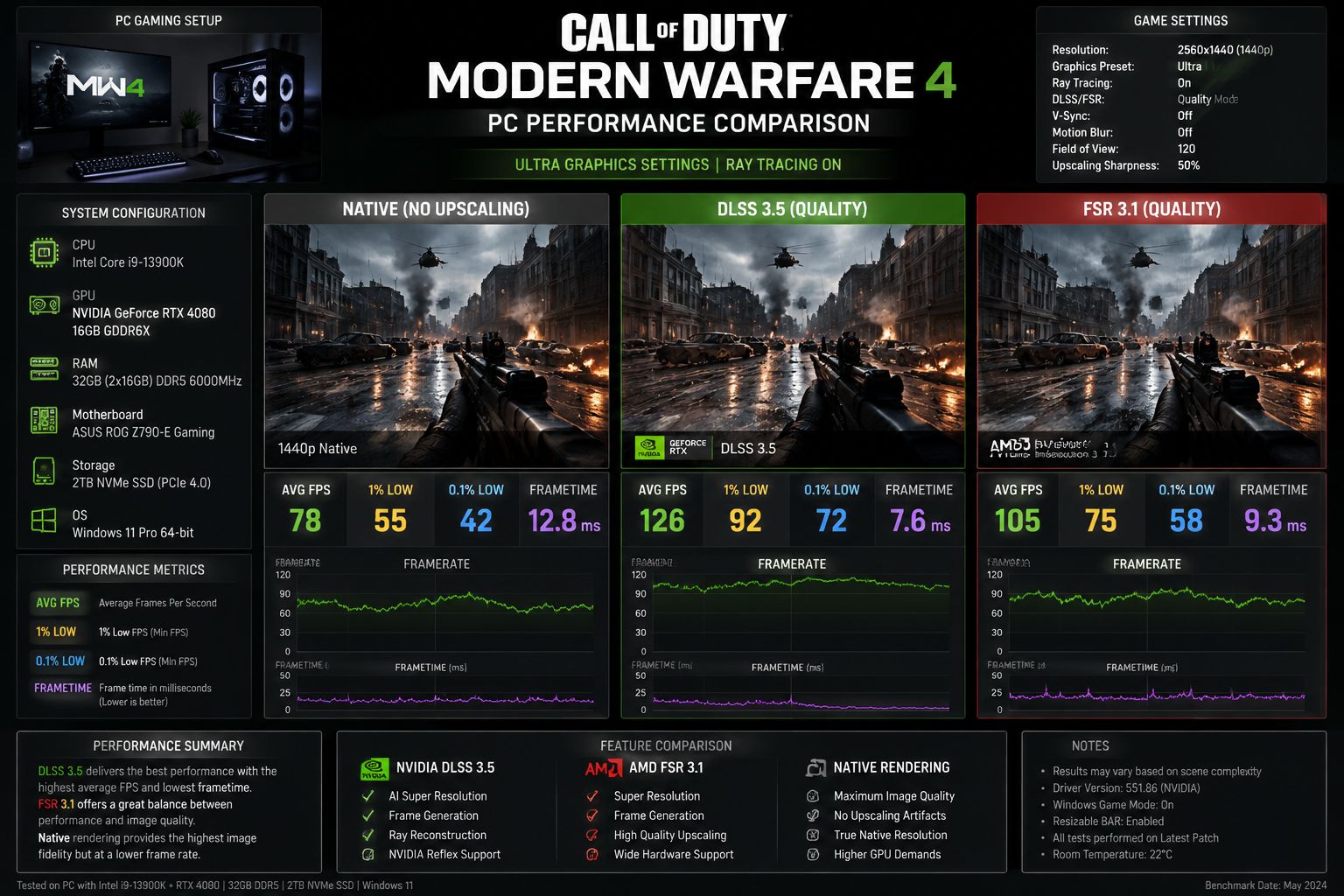
MW4 PC System Requirements
Minimum (1080p / 60 fps / Low): CPU - Intel Core i7-8700 / AMD Ryzen 5 3600 | GPU - NVIDIA RTX 2060 / AMD RX 5600 XT | RAM - 16 GB | Storage - 150 GB NVMe SSD | OS - Windows 10 64-bit (22H2). Recommended (1440p / 144 fps / High): CPU - Intel Core i7-13700K / AMD Ryzen 7 7800X3D | GPU - NVIDIA RTX 4070 / AMD RX 7800 XT | RAM - 32 GB | Storage - 150 GB NVMe SSD. Ultra (4K / 60 fps / Ray Tracing): CPU - Intel Core i9-14900K / AMD Ryzen 9 7950X3D | GPU - NVIDIA RTX 5080 / AMD RX 9070 XT | RAM - 32 GB.
For competitive multiplayer, the recommended setup is an RTX 4070 or RX 7800 XT paired with a current-gen CPU. This configuration will comfortably hit 144 fps at 1440p with DLSS/FSR quality mode and high settings. For the full ray-traced experience at 4K, an RTX 5080 or higher is recommended, though DLSS 4's performance mode makes this more accessible than you might expect. Console players have it easier, with each platform offering optimized presets that balance visual quality and performance out of the box.
Here are our top optimization tips for getting the best performance in MW4:
- Enable DLSS or FSR in quality mode: Always use upscaling in quality mode for the best balance of image quality and performance. The transformer model in DLSS 4 is good enough that you can use it even at 4K without noticeable artifacts.
- Disable motion blur and depth of field for multiplayer: These cinematic effects cost performance and reduce clarity in competitive play. Disable them for a clearer view of the battlefield and a slight FPS boost.
- Adjust ray-tracing settings individually: Ray-traced shadows have the highest performance cost for the least visual impact in fast-paced gameplay. Consider disabling them and keeping RT reflections for the biggest visual payoff per frame.
- Use the in-game benchmark tool: MW4 includes a built-in benchmark that runs through a representative gameplay sequence. Run it after each settings change to verify you are maintaining your target frame rate with acceptable 1% low values.
- Keep your GPU drivers updated: Both NVIDIA and AMD release game-ready drivers specifically for major Call of Duty launches. These drivers include shader optimizations and profile tweaks that can improve performance by 5 to 15 percent.
- Consider upgrading to an NVMe SSD: If you are still using a SATA SSD or mechanical hard drive, upgrading to an NVMe drive will dramatically improve load times and eliminate texture streaming issues.
FAQs About Modern Warfare 4 Engine and Graphics
What engine will Modern Warfare 4 use?
MW4 will use an upgraded version of the IW engine, often referred to as IW 4.0, with significant improvements to lighting, physics, and streaming technology compared to the IW 9.0 engine used in MW3. The core architecture has been rewritten to support full ray tracing and GPU-based asset decompression.
Will MW4 support ray tracing?
Yes, MW4 will feature full ray-traced lighting, reflections, and shadows. The game also supports NVIDIA DLSS 4 with Ray Reconstruction and AMD FSR 3.1 for enhanced performance while maintaining visual quality across all supported platforms.
Does MW4 require an SSD?
Yes, Modern Warfare 4 recommends an NVMe SSD for optimal performance, leveraging DirectStorage 2.0 technology for near-instant asset streaming and dramatically reduced load times. An SSD is effectively mandatory for the full experience, though HDDs are still supported with reduced performance.
What frame rate will MW4 target on console?
MW4 targets 60 fps at 4K on PS5 Pro and Xbox Series X, with a 120 fps performance mode available for players with HDMI 2.1 displays. Base PS5 and Xbox Series X players will see 1440p at 60 fps with dynamic resolution scaling to maintain performance during intense scenes.
Will MW4 have cross-play and cross-progression?
Yes, MW4 will feature full cross-play and cross-progression across all platforms including PC, PlayStation, and Xbox, maintaining the unified Call of Duty ecosystem and allowing players to carry their progress between platforms seamlessly.
Does MW4 support ultrawide monitors?
Yes, MW4 includes native support for 21:9 and 32:9 ultrawide monitors on PC, with proper FOV scaling and HUD positioning to avoid stretching or clipping issues. The game also supports multi-monitor configurations for racing and flight sim setups.
For more Call of Duty coverage, check out Modern Warfare 4 Full Reveal Breakdown and Modern Warfare 4 Multiplayer Innovations.